Everything Tindra does

The full toolkit — first idea to finished book

From outlining and drafting through an AI editorial board, a knowledge-aware story bible, and the whole publishing kit — every feature here is built so a writer using a screen reader can run all of it. Nothing the AI produces becomes canon until you approve it.

A look inside the studio

Four screens from a real project. Every one is fully operable by keyboard and screen reader; the captions describe what's shown.

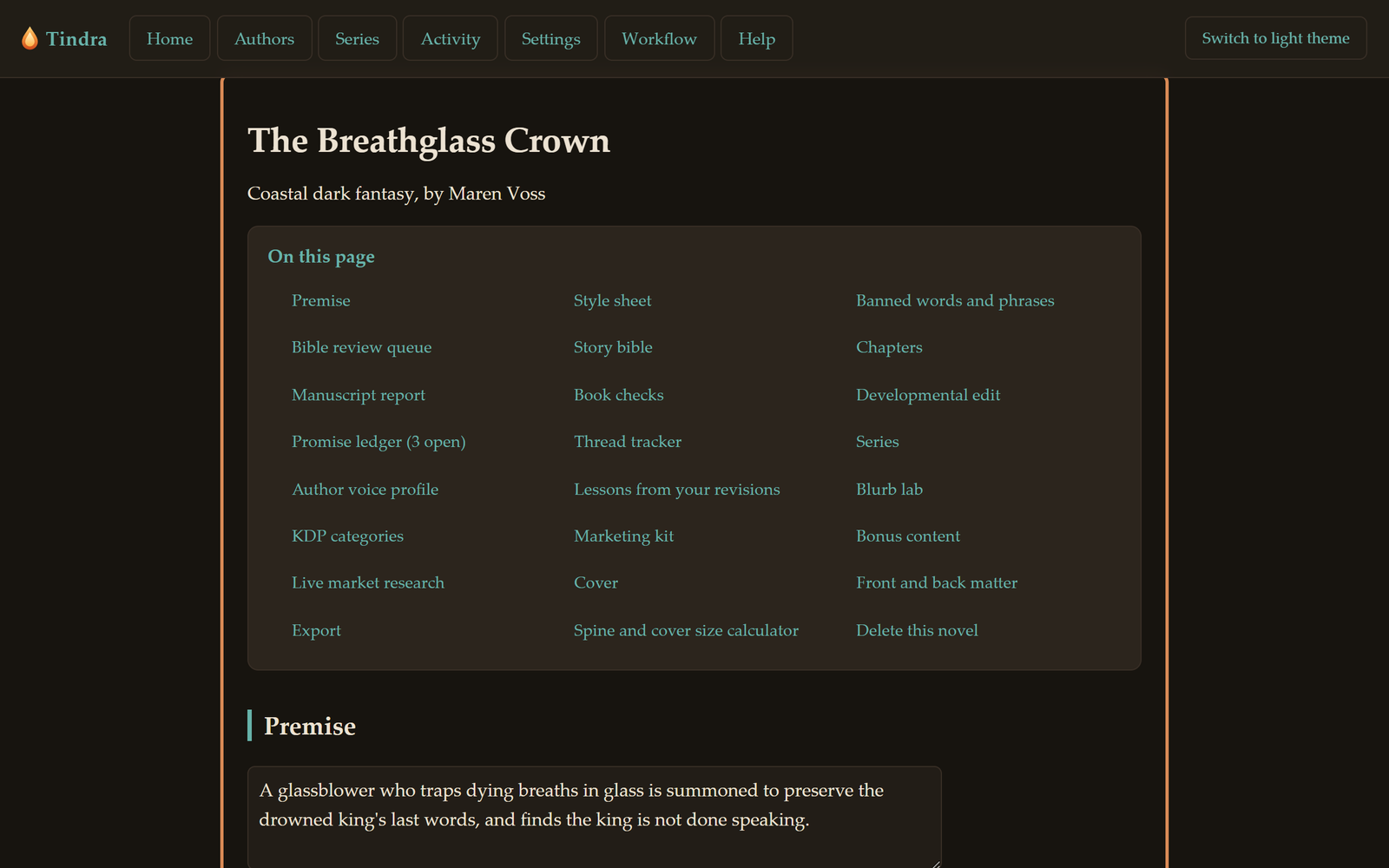
The Tindra studio open on the novel The Breathglass Crown. A row of section tabs reads Book details, Story arc, Story bible, Threads and promises, Causal logic, Cover studio, and Whole-book craft. Below the title sits the book's premise and the start of the Manuscript atlas — a whole-book view that sizes and shades each chapter by how far along it is.
Your whole book in one place Chapters, the story bible, threads, covers, and KDP exports — all from the novel's home screen.
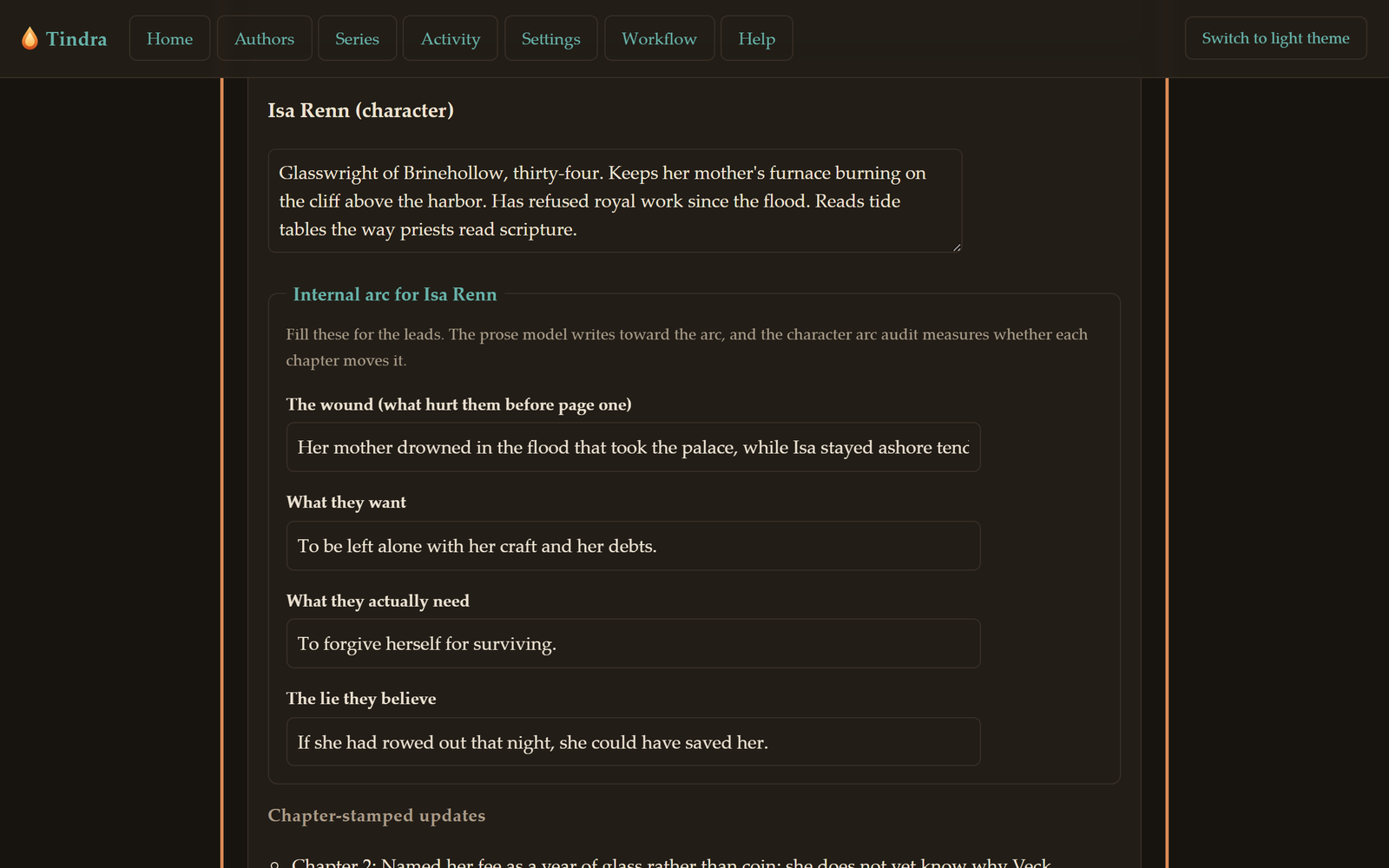
The story bible's Characters section for the same novel. Two entries are shown — Isa and Halvard — each with a paragraph of facts followed by a four-part internal arc set out as Wound, Want, Need, and The lie, every part a single sentence. Isa's lie reads 'Caring is just a longer way to grieve.'
A bible that tracks each character's arc Wound, want, need, and the lie they believe — so the AI writes them changing, not standing still. Facts are stamped to the chapter they become true.
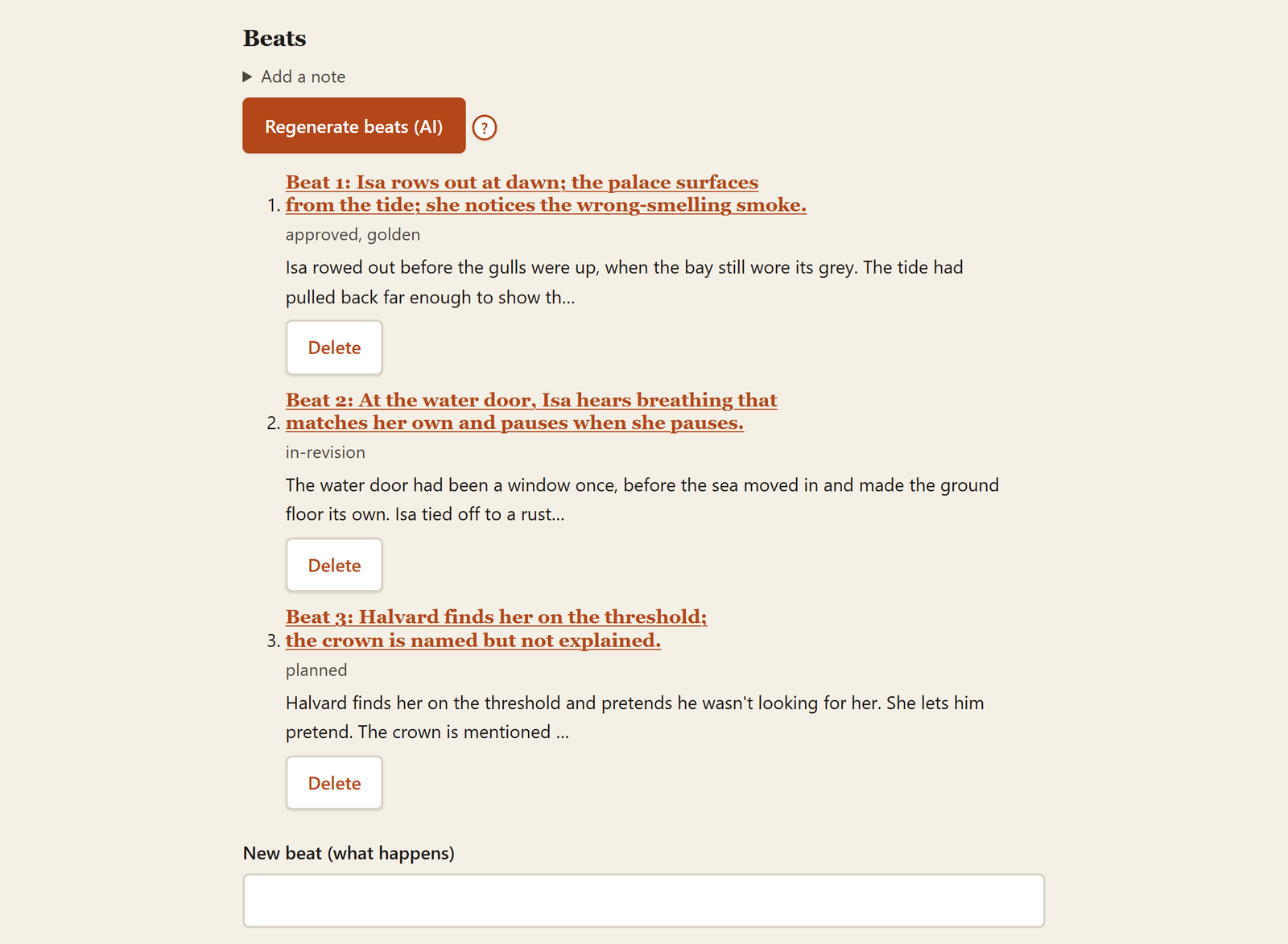
A chapter's Beats list. Three beats each show a status: beat 1 is approved and golden, beat 2 is in-revision, beat 3 is planned. The opening line of each beat's prose is previewed beneath its description.
Every beat, with its status Plan, revise, and approve beats one at a time. Nothing becomes canon until you mark it so.
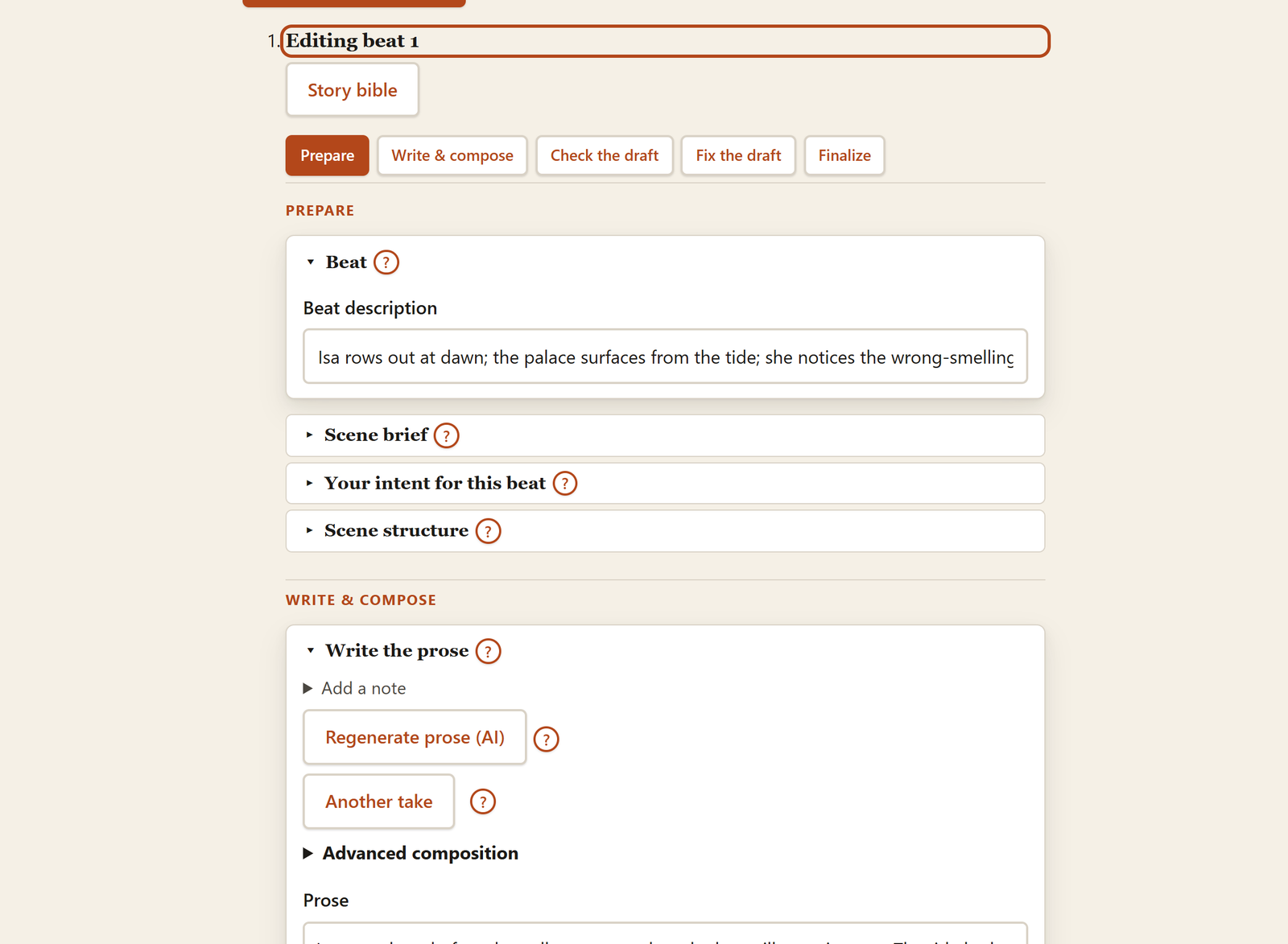
The beat editor open on beat 1. A row of phase tabs reads Prepare, Write & compose, Check the draft, Fix the draft, and Finalize, with Prepare selected. Below it, stacked cards titled Beat, Scene brief, Your intent for this beat, and Scene structure — the Beat card showing the description 'Isa rows out at dawn; the palace surfaces from the tide; she notices the wrong-smelling smoke.' Further down, the Write the prose card holds Regenerate prose and Another take buttons above the drafted prose.
An editor you steer card by card Work a beat in phases — prepare, write, check, fix, finalize — generating, taking another pass, or running three drafts and combining. Always a draft you accept or send back, never an auto-applied rewrite.

Write with you at the wheel

Generation you steer line by line — never a "write my novel" button, always a draft you accept or send back.

Generate, regenerate, and "another take"

Draft a beat from scratch, regenerate a fresh version, or steer a refinement by typing what to change so the model alters only that and keeps everything else. "Another take" writes a deliberately different version of the same events so you can compare and keep the one you prefer.

Scene briefs that write the subtext in first

For each beat you prepare a brief: the emotional shift the scene must earn, what each character is hiding and from whom, the emotional temperature, the truths that must stay unspoken, and what the POV may perceive. The draft steers itself by it — secrets stay implied, the point of view stays honest.

POV profiles, including a blind-narrator preset

Set the point of view once and every draft obeys it: the senses the narrator may use and the perceptions they can't. A built-in first-person blind-narrator preset renders the world through sound, touch, temperature, and timing — and refuses to describe eye contact, glances, or anything seen across a room.

Draft competition: write three, steal the best

"Write 3 and combine" drafts the same beat literary, commercial, and minimalist, then an editor steals the strongest opening, sharpest lines, and truest beats of each into one combined version. The three drafts stay visible, so you can keep any single one instead.

Length targeting that refuses to summarize

Every beat is written as a fully realized scene to a firm word target. A generate-measure-correct loop expands a draft that reads like a summary or tightens one that runs long — then accepts and flags rather than rejecting, so a beat never silently collapses into a sketch.

Banned-words lint with automatic bounce-back

Keep a per-book list of phrases and tics you never want to see — the em dash included. Every generated and edited beat is checked against it, and any draft that slips one in is automatically sent back once to remove it, with the outcome reported in plain language.

Golden beats and an author voice profile

Mark a beat you love as a voice exemplar and future prose is written to match its rhythm, vocabulary, and feel. Tindra can also distill an idiolect and signature passages from a writing sample so drafts sound like a specific human — and audit a finished chapter for voice drift against your exemplars.

Per-beat status with full version history

Each beat moves through planned, in-revision, and approved. Every AI action appends a new version rather than overwriting, so the whole history is yours to compare and revert — nothing is ever auto-applied. Approving a beat mines its prose for durable bible facts you then accept or reject.

An AI editorial board, not a generate button

Specialist editors flag the exact words that read machine-written; a surgical editor repairs only those, leaving the rest of your prose word for word.

The editorial board (span-anchored findings)

Four AI specialists — subtext, narrative distance, predictability, and a final literary read — return precise findings, each quoting the exact span, naming what's wrong, and proposing the smallest fix. The literary editor asks the hardest question: would a discerning reader think this was machine-written, and exactly why?

Surgical repair, word for word

"Repair flagged issues" changes only those exact spans and reproduces the rest of the beat verbatim — if two sentences read machine-made, only those two change. It reports how much of the wording actually moved and warns when an edit was more than surgical. Every result is a reviewable version you choose to keep.

Author-flagged surgical fixes

Flag a specific line by hand — or select prose and press Alt+F — and describe what's wrong. Tindra fixes only that span, leaves every other sentence word for word, and returns a reviewable version rather than overwriting your draft.

A free, instant quality scorecard

Scores a passage 0–100 across rhythm diversity, freshness versus predictable phrasing, emotional restraint, and gesture variety — with a plain-language note carrying the raw numbers, so the "why" is spoken, not just shown as a coloured bar. It runs locally with no AI and never fakes a number it can't measure.

Targeted rewrite passes

Run focused line edits on a drafted beat: tighten and sharpen, deepen interiority, ground it in sensory detail, make dialogue sound like real people, raise tension, fix the opening transition, or add controlled human imperfection. Each pass respects a mode-aware length floor and a quality bar, and Tighten is score-defended so a cut never lowers the prose.

Detect the machine tells

A free mechanical scan flags AI-signature vocabulary (delve, tapestry, a testament to), dead-metaphor clichés, echoed phrases and gestures, and filter words (felt, realized, noticed), plus an AI-likeness report on burstiness and uniform rhythm — then a rewrite can add the contractions, fragments, and varied cadence real human prose has.

Audits: tension, purpose, dialogue, beta readers

Score each beat's tension 1–10 and flag consecutive sags; check that every beat does at least two jobs and name where readers will skim; naturalize too-tidy dialogue; and run a whole-book developmental-edit letter plus a panel of three honest beta readers — the devoted fan, the skimmer, the harsh critic — whose matching predictions reveal predictability.

Author fingerprint and chapter memory

A statistical portrait of how you write — sentence and paragraph spread, dialogue density, contraction habit, favourite openings — steers generation toward your shape, not a generic one. A free chapter-memory read surfaces overused words, repeated gestures, and run-on openers and distils them into an avoid-list for the next beat.

A story bible that knows what the reader knows

A single source of canonical truth, consulted in every prose and edit path — filtered to the current chapter so a later reveal never leaks into an earlier one.

The bible (characters, locations, world, themes)

The AI drafts a first bible from your premise and chapters; you then edit, add, and delete entries by hand. Generation, every rewrite mode, the meld passes, and the audits all build their prompt from it — so everything Tindra produces stays consistent with what's recorded here.

Internal arcs: wound, want, need, lie

Lead characters carry an internal arc — the wound that shaped them, what they want, what they actually need, and the lie they believe. The prose model writes them moving along that arc rather than standing still, and an arc audit measures the result.

Chapter-stamped facts with knowledge boundaries

Tie any fact to the chapter it becomes true, and optionally to exactly who knows it. The AI only sees a fact from that chapter onward, so a later reveal or death never leaks backward — and a secret marked "known only to" certain characters can't be revealed or acted on by anyone else.

Provenance and one-click re-sync

Every mined fact remembers the beat it came from. Rewrite a beat and "Re-sync bible from this beat" retires its stale facts and re-mines the new prose into the review queue; a chapter-level version re-syncs all of a chapter's beats at once. Nothing is ever auto-overwritten.

Accept / reject proposal queue

When you approve a beat, Tindra reads its prose for durable new canon — a revealed scar, a new place, a shifted relationship — and queues each as a proposal. Accept facts into the bible or reject them, fix mis-attribution with an "Attribute to" dropdown, with Accept-all and Reject-all for the whole batch.

Fast fact-review table

A screen-reader-friendly table of every fact in the book — identity facts plus chapter-stamped changes — with per-row controls to edit the wording, move a fact to the correct character when it's mis-attributed, or delete it. A faster way to audit canon than paging through entry cards.

Thread and promise trackers

Track ongoing subplots so they never starve — each with the chapters it appears in and an active or resolved status — and narrative promises planted in one chapter and tracked open until they're paid off with a payoff note and chapter. A long book's threads never quietly vanish.

Layered continuity, fixed against canon

Three escalating audits — an inline per-beat guard, a per-chapter prose check, and a whole-book sweep — list every contradiction against the bible. A converging reconciliation then fixes them surgically and re-verifies until clean, with canon always winning and the rest of the beat reproduced verbatim.

Meld, so separate beats read as one scene

"Meld" rewrites the seam between consecutive beats — and across the wider book — so beats written separately read as one continuous scene, always as a reviewable version you can revert.

Series-shared bible with carry-forward

A series owns a shared bible every member book sees during generation, layered under each book's own local entries. Finish a book and carry-forward flattens its evolved canon into the series baseline, so the next book starts from where the characters ended.

From manuscript to storefront

Everything between "the draft is done" and "it's live on Amazon" — exports, covers, blurbs, keywords, and market research, all in the same studio.

KDP-ready EPUB 3 and .docx exports

Compile a reflowable EPUB 3 and a KDP-ready Word .docx with a real title page, copyright, dedication, one Heading 1 per chapter so Kindle builds its own table of contents, page breaks before chapters, first-line indents, and standard back matter — review ask, links, About the Author, Also by.

Print interior, paperback and hardcover

Generate a print-ready .docx interior at your trim size with mirrored margins, a binding gutter that grows automatically with page count, running headers (author left, title right), centred page numbers, and justified body with chapters starting on a new page.

Series boxed-set EPUB

Assemble every book in a series into one boxed-set EPUB in reading order, with per-book divider pages, a unified table of contents, and series metadata — a complete collection as a single uploadable file.

Blurb lab and marketing kit

Draft a selling Amazon book description in your genre's voice — hook line, the leads and the conflict between them, an honest read on heat and tone, a closing question that makes a browser click buy. The marketing kit adds the tropes you deliver, "X meets Y" comps, the hashtags your subgenre follows, and a punchy ad line.

KDP keywords, categories, and critique

Get the seven search keyword phrases readers actually type, a category strategy that scores candidate Kindle paths for fit and competition and recommends three, and a critique of your own chosen categories for relevance risk, crowding, and redundancy — with concrete swaps.

Live Amazon market research (your SerpAPI key)

Look up the current top Amazon results through a relay that forwards your own SerpAPI key — only the public search, never prose or vault data — then have your reviewer model assess how crowded the slice is, what the top sellers promise, the gap you could own, and a realistic read on breaking in, citing specific titles.

Amazon A+ Content, six detail-page modules

Draft the six rich modules of your Amazon detail page in order — headline banner, About this book, From the author, "Perfect for fans of," What's inside, editorial pull quote — each within Amazon's length limits with live counts and Copy buttons. Every module carries a suggested image description that doubles as accessible alt text.

A+ draft images at exact Amazon dimensions

Generate a text-free draft marketing image per A+ module, then download it resized through a browser canvas to the exact standard Amazon dimensions (970×600, 970×300, 300×300, 220×220, 600×180). A vision model honestly describes what was actually generated — subject, accidental text, artifacts — so a blind author can judge it before uploading.

Cover Studio: art-director chat to covers

Brainstorm a concept with an art-director model that knows what sells in your genre on Amazon, every visual idea described in rich concrete detail. Distil the conversation into a generation-ready prompt, then generate covers and download them at KDP ebook size (1600×2560).

Honest cover descriptions, thumbnail test, compare

Because the describing model never sees the prompt that made a cover, it reports what's genuinely there — a structured six-part read including garbled typography and every flaw, a thumbnail test that downscales to ~120px Amazon-search size and verdicts whether it still reads, and a side-by-side comparison of two versions.

Wraparound print cover with computed spine

Build the full paperback or hardcover wraparound — back, spine, front — on a 300-DPI canvas with the spine width computed from your page count and paper, then export the single-page PDF KDP requires. An independent describer flags text near trim edges, crooked spine text, and other review failures.

Accessible text overlay with AI placement

Place real, crisp title and author text over generated images — which AI models garble — entirely through parameters, never dragging: words, position, alignment, size, font, colour, weight, and a legibility backing. A vision model looks at the actual image and recommends placement that maps straight onto the controls, with a plain-language rationale.
Screen-reader-first, not screen-reader-compatible

Tindra was built by and for a blind novelist who works in JAWS every day. Non-visual operability isn't a checkbox here — it's the defining constraint the whole app is shaped around.

JAWS-tested, from the ground up

Every screen, action, and result is designed and verified against a real screen reader, with fixes shipped straight from the author's own JAWS testing. The focus, announcer, and shortcut helpers are shared infrastructure imported by nearly every view — accessibility architecture, not a retrofit on one screen.

Real semantic headings for heading-jump nav

Every screen, card, beat, chapter, and AI result is a true h1–h6 in a correct hierarchy — never bold-as-heading — so a screen-reader user can move through a long manuscript and dense panels by jumping heading to heading, their primary way of navigating.

Full keyboard control with Alt+key shortcuts

Every action is reachable by keyboard through an Alt+key scheme chosen to pass cleanly through the JAWS virtual cursor — global navigation plus contextual beat-editor actions like Alt+G generate, Alt+B board, Alt+Enter save, Alt+J/K next and previous beat, and Alt+F to flag a selection. Alt+/ opens a focus-trapped help dialog listing exactly the shortcuts currently live.

Focus is never thrown to the top of the page

Action buttons stay focusable while their work runs, so pressing Generate or Save never silently dumps you back to the top — a shared busy-button uses aria-disabled and aria-busy instead of native disable, backed by an app-wide focus-rescue safety net.

JAWS buffer refresh after every result

When an AI action swaps content in, focus deliberately lands on the result's own fresh, remounted heading — the specific move that forces JAWS to rebuild its stale virtual buffer so you read the new text, not old "Working…" content. Async-loaded screens wait for the real data before focusing, so a screen reader never snapshots an empty "Loading…" view.

Everything spoken; nothing carried by colour alone

A single app-wide polite live region announces every completed action and long operation — start and finish — whatever view is mounted. Status and state are always carried in words: a cover's described or undescribed state is spoken as a full sentence, never signalled by colour alone.

Every generated visual described in honest words

Covers and AI-generated marketing images are described in rich, structured words by a separate model that never saw the prompt — an honest report of subject, composition, accidental text, and AI artifacts — so a blind author can judge and direct visual work they cannot see.

AI text-placement recommendations you can't eyeball

Because a blind author can't see where title or headline text should sit, a vision model looks at the actual generated image and returns placement — position, alignment, colour, font, weight, size, legibility backing — as ready-to-apply settings plus a plain-language rationale that prefills the overlay editor.

Ready to direct your novel?

Seven days free. Every feature on this page included.

See pricing & start free